Showing posts with label how to. Show all posts

Wednesday, February 2, 2011

Website Wed: My Google Maps


View Young Conservation Area in a larger map
Google maps are already pretty good, why would I want to create my own map? Well, you might want to direct birders to the spot where you glimpsed a mysterious bird--was it a Snowy Owl or a partially-albino (leucistic) Barred Owl? Maybe you have a new location for the botany group to visit on their next field trip. There's a new location for the annual banquet--here. You can do all this with Google's "My Maps." (You need a free Google account if you don't already have one.)
Save to… Create a new map
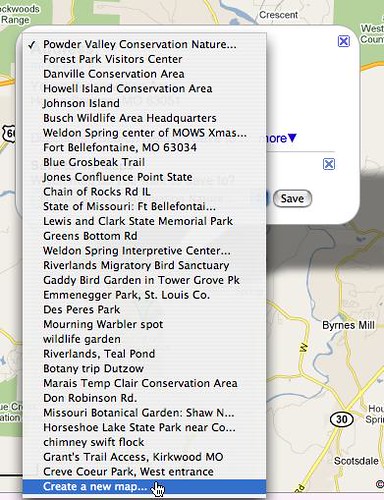
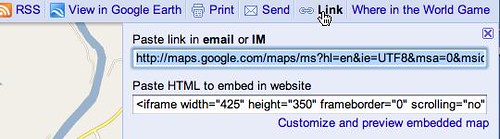
The easiest way to do this is to do a search for an address, but you can also just enter a location, such as Hilda Young Conservation Area. When I typed in the name, I got a map with thumbtacks in 6 results for my "Hilda Young" search--none of them correct. But when I adjusted the slider on the left of the map to zoom out to a larger view, I saw the conservation area. With a click, a balloon pops up offering "Save to…" I chose "create a new map." Now I can edit my own balloon, even add links. Once saved, on top right is "Link." Here I copy the link to paste into an email or set a link on a web page. Use the embed code if you want to embed it into your website and allow people to interact with the map as I have above.

Your "My Maps" have many uses. Send your visiting college roommate an email or instant message telling them how to get to your house--not recommended in public messages on Facebook. Use the link in your organization's newsletter or web page for the next meeting or banquet. When you find a rare bird, make a Google map and put it in the birding forum or list serve. If you post nature photos on Flickr, Flickr has a similar map function.
Copy the link to share it in email, or embed code for a website
My favorite use is to put the link in a Google calendar event. The map that links to the "where" field in your calendar event is chosen by Google automatically. However, if more than one location has the same or similar name, Google may link to the wrong one. Instead of typing the name in "where," you enter latitude and longitude. I don't have a GPS system, so I just type in an address and get the coordinates at iTouchMap.com. Then, in the field "Where," I put the numbers iTouchMap provided, followed by the place name in parentheses.
Monday, July 19, 2010

Join a Flickr Group


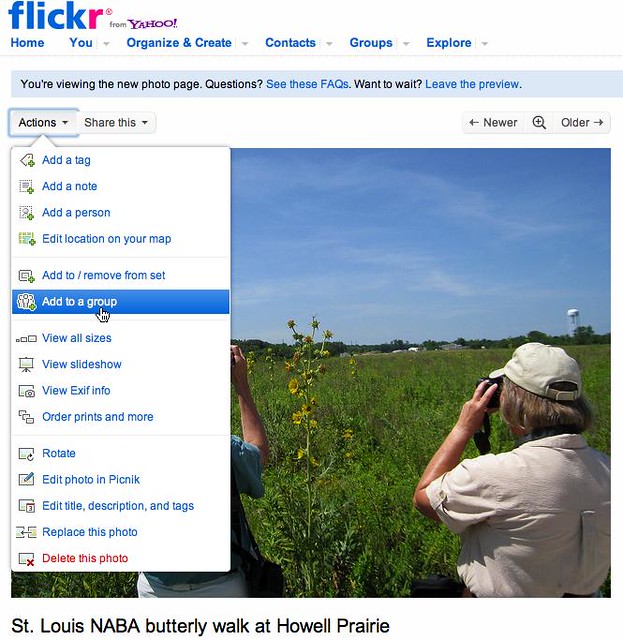
I have to talk a bit more about Flickr, the photo storing and sharing website, and then it’s back to the back yard. Yesterday I talked about searching Flickr and copyright issues. Another cool thing about being a Flickr member is joining a “Group.” All that means is that someone has organized a page dedicated to a certain type of photo. Almost all groups are open to everyone and have some guidelines. Usually there is an active moderator who looks over the photos and edits if necessary. For example, my nature study club, the Webster Groves Nature Study Society, has a group called Nature Study with WGNSS. Anyone who has an interesting photo of nature is invited to join the group and share it. Visit the group, click “Join.” Then use the “Actions” menu above your photos to “Add to a group.” 


Of course, you don’t have to share a photo or be a member of WGNSS to join our Flickr group. The main advantage to joining a group is that Flickr makes it easy to find your groups out of the infinite number of groups offered. There is also a discussion board for each group, most of which specify that only members can participate in discussion posts.

The next cool thing is to view the “slideshow.” The group’s home page will display 12 photos. At the bottom right is a link to “>>More.” You can choose to look at one photo by clicking the thumbnail or—better yet—at top right, click “Slideshow.” Flickr now shows each of the photos at full screen for a few seconds.


Some groups I like are: The Ozarks, Missouri Birds, Signs Signs, Missouri Native Plants, and Droplets on Leaves, just to name a few. With a free membership, you can join 10 groups. On your Flickr home page, you can search for a group thats centered around your favorite topic.

Maybe the most fascinating group is ID Please! People submit a photo of a bug, bird, fern, or fungus that they can’t identify. Members from around the globe respond by commenting on the photo. Now, when I can’t be out in the field arguing over an Empidonax flycatcher or a skipper butterfly, I can trade ideas and hear from experts online.
Thanks to my Flickr friend Hector for his amazing photo of Northern Flickers© in Coquitlam, British Columbia!